 RSS Feed
 Twitter
 10:18 AM
 Sult Soni
Hallo every one today I am giving you a tips to create a excellent test effect... like bellow....

Is not it amazing.................?
OK lets start..
1) Run your adobe photoshop 7.0 > open a new file that showing below...

2) Now fill the background with black > select text tool then change that shoes below....

3) Write something then select move tool > press "ctrl + t " > move and re-size the text. Now follow the next photos commands.....


8) Now edit the blue markings like the nest photo then press OK....


Is not it amazing.................?
OK lets start..
1) Run your adobe photoshop 7.0 > open a new file that showing below...

2) Now fill the background with black > select text tool then change that shoes below....

3) Write something then select move tool > press "ctrl + t " > move and re-size the text. Now follow the next photos commands.....

4) Now go to filter and do that....

5) Press OK then do this.....

6) Now press " ctrl + f " 3 times then follow the next photo commands...

7) Go to the filter menu again then do that.....

8) Now edit the blue markings like the nest photo then press OK....
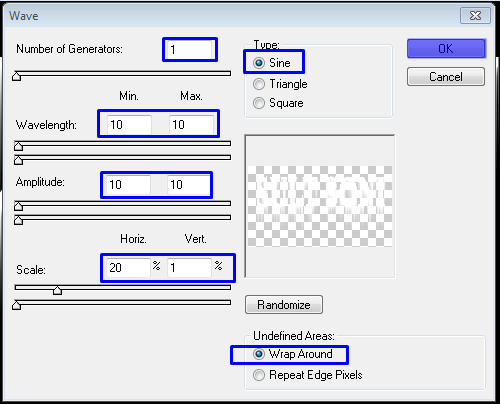
9 Now select the background color red then follow the next photos commands.....


10) Now edit the blue markings like the next photo then press OK...

OK
You done
enJoy
I will try to upload more tips next time...
Thanks all to view
Bye Bye..


